A two-minute search guide
How to find old tweets by date.
Search old public X/Twitter posts from one account, one month, or one keyword—without scrolling years of timeline history.
Manual method included · No account required by the extension · No tracking
Quick answer
Use four small search operators.
In X search, combine from:, an optional keyword, since:, and until:. For a complete calendar month, use the first day of that month and the first day of the following month.
from:elonmusk Starship since:2024-01-01 until:2024-02-01 0:31
0:31
See the complete workflow
From public profile to old post in 31 seconds.
The demo opens Elon Musk's public profile, selects January 2024, adds the keyword Starship, and lands on a matching live X result.
Method 1 · Manual
Build the X search yourself.
Use this when you already know the handle and date. It works without installing anything.
-
01
Choose the account
Open the public profile or note its handle. Use the handle without the leading
@afterfrom:.from:elonmusk -
02
Set the month boundaries
For January 2024, start on January 1 and set the upper date to February 1.
JAN 01FEB 01 -
03
Add a keyword or phrase
Use one word for a broad search, or quotation marks when the exact phrase matters.
Starship or "product market fit" -
04
Paste it into X search
Open the Latest tab when you want chronological results. Your normal X session controls what is visible.
from:handle keyword since:YYYY-MM-DD until:YYYY-MM-DD
Query anatomy
What each part does.
from:elonmuskLimits results to public posts from one account.
StarshipLimits results to posts containing the keyword. Remove it to see all matching posts.
since:2024-01-01Starts the time window on the target month's first day.
until:2024-02-01Uses the following month's first day as the upper boundary.
Method 2 · Faster
Let the extension calculate the dates.
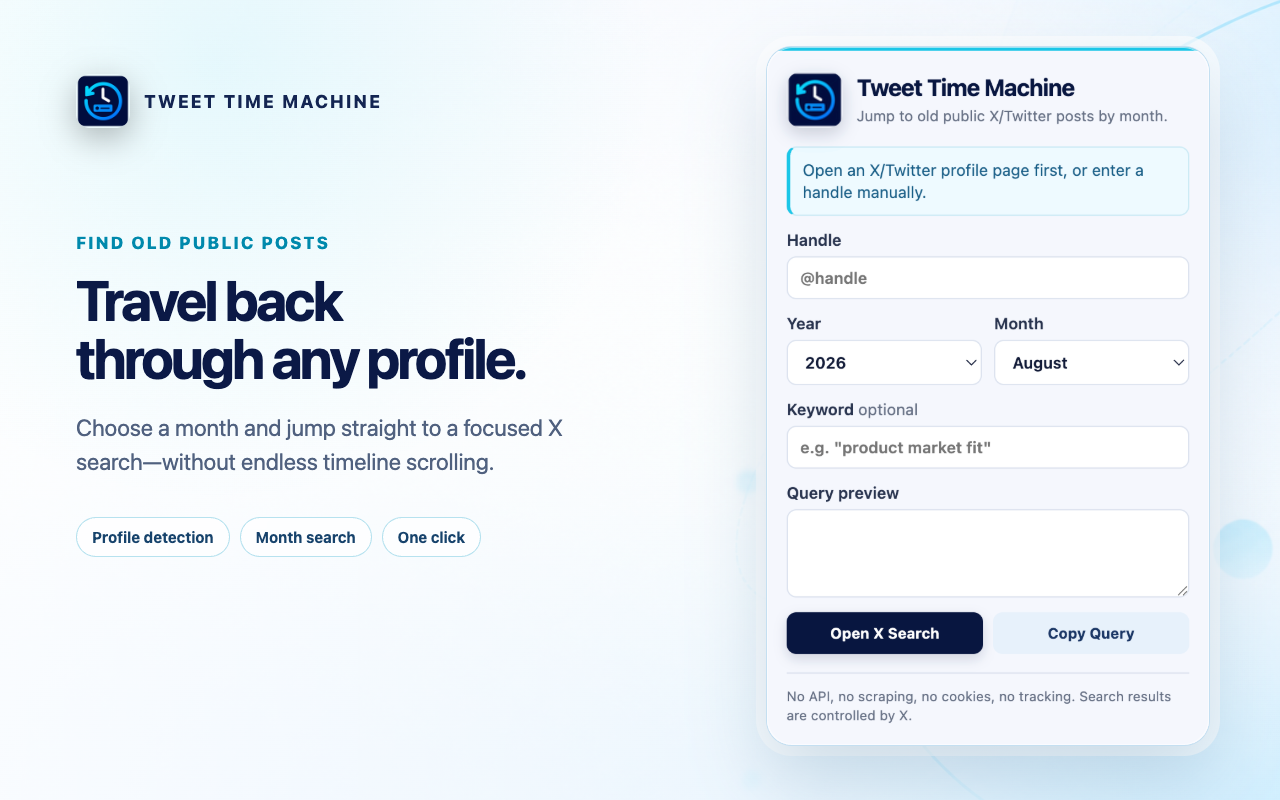
Tweet Time Machine turns the same search syntax into a small Chrome popup. Open a supported profile, pick the year and month, add an optional keyword, and review the query before opening X search.
- 01Open a public profile
The handle is detected from the active X/Twitter URL after you click the extension.
- 02Choose year and month
The correct month boundaries are generated automatically.
- 03Open live results
Inspect the query, copy it, or open the X Latest search in a new tab.
Useful refinements
Three ways to narrow the search.
Exact phrase
Wrap multiple words in quotation marks: "product market fit".
Different month
Move both date boundaries together. The upper date should be the next month's first day.
All posts that month
Remove the keyword and keep only the account and date operators.
Know the boundary
X controls what the search can return.
This workflow cannot recover deleted, private, or protected posts, and it does not guarantee complete historical coverage. Results may depend on X availability and your normal X session. Tweet Time Machine generates a search URL; it is not an archive or scraper.
Frequently asked
Short answers.
Can I find old tweets from a specific account?
Yes. Use from:handle with since: and until: dates, or open that public profile and let Tweet Time Machine detect the handle.
How do I search one exact month?
Use the first day of the month as since: and the first day of the following month as until:. The extension calculates both dates automatically.
Can I search for an exact phrase?
Yes. Put the phrase in quotation marks, for example "product market fit".
Does the extension scrape X or use the X API?
No. It generates the query locally and opens X's public search page. It does not scrape posts, read cookies, or use the X API.
Can it find deleted or private posts?
No. X controls the results, and this workflow cannot access deleted, private, or protected content.

Ready when the memory is vague
Pick the month.
Find the post.
Try Tweet Time Machine in Chrome
Free · Minimal permission · No tracking